
 Create A Nature Inspired Digital Illustration in Photoshop
 Quick Tip: Learn How To Create a Vintage Photo Effect in Photoshop
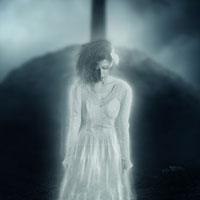 Members Area Tutorial: Create A Dark Ghostly Scene Photo Manipulation
Have every post delivered to your inbox and get access to hundreds of useful design freebies.
Today our expert members tutorial offers something a little different. We have a real life design casestudy from world renowned designer Wojciech Magierski.
Wojciech has agreed to talk you guys through his typical workflow in the creation of his popular piece ‘Voices’.
There are plenty of actionable quick tips throughout this tutorial, and beyond that it’s really inspiring to see how the pro’s go about their image creation.
As always, this is the final image that we’ll be creating:

I set the canvas to a4 (300 dpi).
The first thing I create is a background. I decided to create a black and white shapes, as it gives our image more contrast.
I take a watercolor brush and start to paint a black area.

I duplicate the layer.
On the copied layer I use a pixel effect called Mosaic – you can find it on Filter > Pixelate > Mosaic.

Here I repeat Step 1.
I create a new layer after creating my mosaic and apply black watercolor markings.

Now, I duplicate the new watercolor layer and move it up to make the background design more complex.

I start to add more visual elements using the path tool and I experiment with creating some shapes.
You can make a selection and then use a soft paintbrush to vary the tones (mine vary from light gray to black).


Tom is the founder of PSDFAN. He loves writing tutorials, learning more about design and interacting with the community. On a more interesting note he can also play guitar hero drunk with his teeth.


Do you know the basic tools in Photoshop but feel that your work is still looking average? Join our creative community at FanExtra and get the direction you need to take your work to the next level.


Leave a comment
0 Comments:
No comments have been posted yet. Be the first!