PSDFan Extra

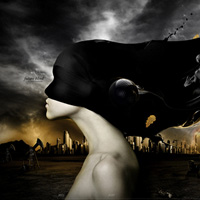
Featured Artist: Martin Grohs

Featured Artist: Martin Grohs

By Tom Ross, 17th April, 2012, 5 Comments

(Articles - Inspiration)

Today we feature the work of Martin Grohs, a hugely inspiring digital artist from Germany. Martin’s work is really evocative, often dealing with emotive issues. His compositions are very intense, combining strong lighting/coloring effects with bold subjects and themes.

Read more...

Photo Manipulate a Surreal Coffee Machine Contraption

Photo Manipulate a Surreal Coffee Machine Contraption

By Jenny Le, 16th April, 2012, 16 Comments

(Photo Effects - Tutorials)

Learn how to create a surreal photo manipulation featuring a conceptual coffee contraption. You’ll work with photo manipulation, retouching, masking, brush application, blending and more! Download the source file for this and all our other tutorials in our FanExtra Members Area

Read more...

30 Minute Redesign #88: Two Sided Perspective

30 Minute Redesign #88: Two Sided Perspective

By Tom Ross, 14th April, 2012, 0 Comments

(30 Minute Redesigns - Articles)

Each week I will analyze one of our reader’s websites. I then redesign their site in just 30 minutes, showing just how much can be improved in a small period of time. This week: Two Sided Perspective gets a redesign.

Read more...

Photo Manipulate a Kick Ass Flaming Skull Scene

Photo Manipulate a Kick Ass Flaming Skull Scene

By Tom Ross, 13th April, 2012, 1 Comment

(Photo Effects - Tutorials)

Learn how to create a cool flaming skull effect as part of a dark, gothic photo manipulation. You’ll work with image transformations, blending, lighting effects and more! Download the source file for this and all our other tutorials in our FanExtra Members Area

Read more...

Texture Thursday: BSTR

Texture Thursday: BSTR

By Andre Meca, 12th April, 2012, 0 Comments

(Downloads - Textures)

This week’s Texture Thursday offers 4 super high-res BSTR textures, free to use in your own designs.

Read more...

Your Design Work, But More Awesome:

Do you know the basic tools in Photoshop but feel that your work is still looking average? Join our creative community at FanExtra and get the direction you need to take your work to the next level.

JOIN OUR FANEXTRA COMMUNITY TODAY
